> ## Documentation Index
> Fetch the complete documentation index at: https://docs.depict.ai/llms.txt
> Use this file to discover all available pages before exploring further.
# Depict UI migration v3 -> v4
This page does not apply to installs made in 2025 or later of the Depict Shopify apps
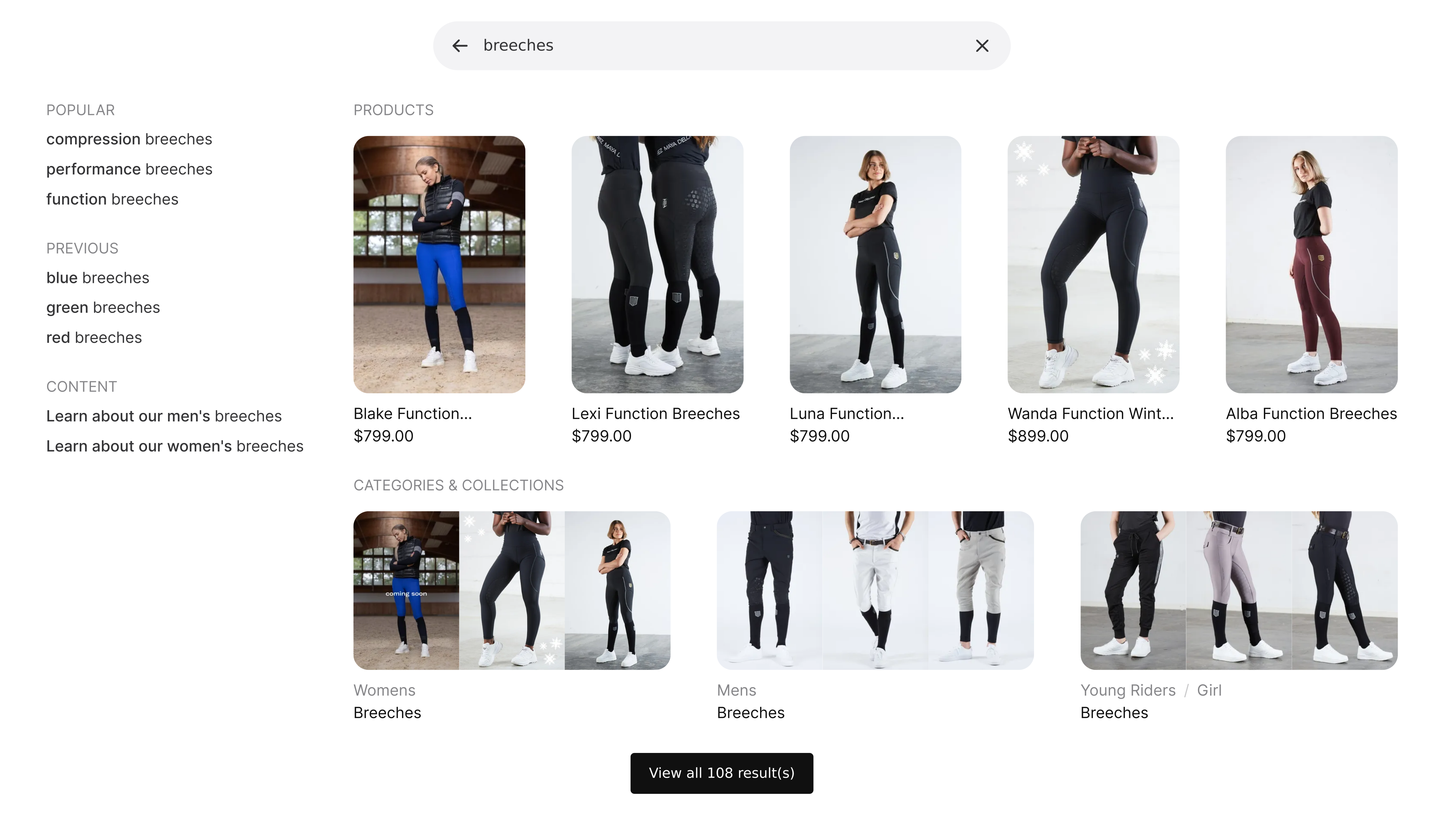
With the major version `4` of the Depict UI there's one notable breaking change that applies to everyone: a new, redesigned, search modal is the new default.
 {
// In prod, they have some zoom thing which breaks aspectRatio, work around that. Unfortunately this is not in the SSR'd output so there's still some CLS.
const direct_parent = element?.parentElement;
if(direct_parent?.matches?.("[data-rmiz-content]")) {
Object.assign(direct_parent.style, {
width: "100%",
display: "flex",
justifyContent: "center",
alignItems: "center"
})
}
const parents_parent = direct_parent?.parentElement;
if(parents_parent?.matches?.("[aria-owns^='rmiz-modal']")) {
parents_parent.style.width = "100%";
}
}}
/>
([Reminder on where the user encounters the search modal](/react-ui-guide/search/overview#2-the-search-modal-opens).)
## Updating to version 4
1. Update all depict packages to the **latest version** (`@depict-ai/react-ui` to **at least** version `4.0.17` or `@depict-ai/js-ui` to **at least** `4.0.17`).
## Changes applicable to all Depict UI users
1. By default, the search modal is now the modal shown above. You can try it out on the [preview browser](https://demo.depict.ai/mayadelorez/global/en_GB/). If you want to keep the old search modal after updating, see [switching to the classic search modal](/other-guides/introduction#switching-to-the-classic-search-modal).
## Other changes that might affect you
1. The new search modal extensively uses new CSS features (like [container queries](https://caniuse.com/css-container-queries), [:has()](https://caniuse.com/css-has)), only supported by the last two versions of all evergreen browsers, as of writing. This means if you want compatibility with browsers older than that, you have to [switch to the classic search modal](/other-guides/introduction#switching-to-the-classic-search-modal) or resolve any styling inconsistencies yourself.
2. The container of the images in the search modal has a self-adjusting aspect ratio to the most prevalent aspect ratio of your images. However, before the images are loaded a default aspect ratio of `1` is used. This means that if your images have a different aspect ratio than `1`, the container will jump around a bit before the images are loaded. If you want to avoid this, set the `--image-aspect-ratio` CSS variable to your image aspect ratio, example: `.depict { --image-aspect-ratio: calc(400 / 600); }`.
3. We have removed some lines in the filter UI or made them more subtle to achieve a cleaner and more minimalistic look.
4. For the images in both modal variants to display, the displays returned form the displayTransformer/our backend now need to adhere to the standardised `image_urls: string[]` format. If you notice this is not the case, please ping your customer support representative.
5. Support for Depict's old display format (the one not containing `variant_displays`) has been ditched (for both modal variants), this is unlikely to impact any customers updating to v4.
6. If you manually open the modal using the `@depict-ai/ui` package's `modal_open` interface (no customer does AFAIK) you now have to provide `alignmentSignals_` instead of `style_props_` to the modal for custom alignment.
{
// In prod, they have some zoom thing which breaks aspectRatio, work around that. Unfortunately this is not in the SSR'd output so there's still some CLS.
const direct_parent = element?.parentElement;
if(direct_parent?.matches?.("[data-rmiz-content]")) {
Object.assign(direct_parent.style, {
width: "100%",
display: "flex",
justifyContent: "center",
alignItems: "center"
})
}
const parents_parent = direct_parent?.parentElement;
if(parents_parent?.matches?.("[aria-owns^='rmiz-modal']")) {
parents_parent.style.width = "100%";
}
}}
/>
([Reminder on where the user encounters the search modal](/react-ui-guide/search/overview#2-the-search-modal-opens).)
## Updating to version 4
1. Update all depict packages to the **latest version** (`@depict-ai/react-ui` to **at least** version `4.0.17` or `@depict-ai/js-ui` to **at least** `4.0.17`).
## Changes applicable to all Depict UI users
1. By default, the search modal is now the modal shown above. You can try it out on the [preview browser](https://demo.depict.ai/mayadelorez/global/en_GB/). If you want to keep the old search modal after updating, see [switching to the classic search modal](/other-guides/introduction#switching-to-the-classic-search-modal).
## Other changes that might affect you
1. The new search modal extensively uses new CSS features (like [container queries](https://caniuse.com/css-container-queries), [:has()](https://caniuse.com/css-has)), only supported by the last two versions of all evergreen browsers, as of writing. This means if you want compatibility with browsers older than that, you have to [switch to the classic search modal](/other-guides/introduction#switching-to-the-classic-search-modal) or resolve any styling inconsistencies yourself.
2. The container of the images in the search modal has a self-adjusting aspect ratio to the most prevalent aspect ratio of your images. However, before the images are loaded a default aspect ratio of `1` is used. This means that if your images have a different aspect ratio than `1`, the container will jump around a bit before the images are loaded. If you want to avoid this, set the `--image-aspect-ratio` CSS variable to your image aspect ratio, example: `.depict { --image-aspect-ratio: calc(400 / 600); }`.
3. We have removed some lines in the filter UI or made them more subtle to achieve a cleaner and more minimalistic look.
4. For the images in both modal variants to display, the displays returned form the displayTransformer/our backend now need to adhere to the standardised `image_urls: string[]` format. If you notice this is not the case, please ping your customer support representative.
5. Support for Depict's old display format (the one not containing `variant_displays`) has been ditched (for both modal variants), this is unlikely to impact any customers updating to v4.
6. If you manually open the modal using the `@depict-ai/ui` package's `modal_open` interface (no customer does AFAIK) you now have to provide `alignmentSignals_` instead of `style_props_` to the modal for custom alignment.